
Anyone who works regularly from home knows the feeling: after hours at the desk, the back starts aching, the neck tightens up, and concentration fades. According to recent surveys, around 64% of remote workers suffer from back or neck pain while working from home — a figure notably higher than for traditional office employees. The good news: with the right measures, this can be addressed effectively.
Why the Home Office Puts Strain on Your Back and Neck
In a conventional office, furniture is usually ergonomically designed — height-adjustable desks, approved office chairs, structured breaks. At home, the reality often looks quite different: people sit at kitchen tables, on chairs that are too low, or with a laptop on the sofa. On top of that, the casual movement that comes with office life — walking past colleagues, heading to the coffee machine — disappears entirely.
The result is poor posture held for hours on end. The back muscles fatigue, the spine is loaded unevenly, and tension can spread from the neck all the way down to the lower back. Those who ignore these signs risk turning short-term discomfort into a lasting problem.
For persistent back pain or severe symptoms, always consult a doctor — the following tips are intended as general support and do not replace medical advice.
Tip 1: The Ergonomic Foundation — Adjusting Your Chair, Desk, and Screen Correctly
The most important step in preventing back pain when working from home is correctly setting up your workspace. Many people underestimate how much difference a properly adjusted seated position can make.
Key adjustments at a glance:
- Seat height: Thighs horizontal, feet flat on the floor or on a footrest.
- Backrest: Angled at 90–110 degrees, with a lumbar support gently supporting the lower back.
- Screen height: The top of the monitor should be at eye level or slightly below — keeping the neck in a neutral position.
- Keyboard and mouse: Positioned so that the elbows form roughly a 90-degree angle and the shoulders remain relaxed.
- Distance from the screen: About an arm's length — too close strains the eyes, too far causes leaning forward.
Those without a height-adjustable desk can achieve a lot with a laptop stand and an external keyboard. A firm seat cushion can also help support the lumbar spine.
Tip 2: The 20-20-20 Rule and Regular Movement Breaks
Even a perfectly set-up workspace won't prevent tension if you sit motionless for hours. Static loading — holding a position without movement — causes the muscles to fatigue quickly and promotes tension in the neck and shoulder area.
The 20-20-20 rule for eyes and neck: Every 20 minutes, look at something 20 feet (about 6 meters) away for 20 seconds. This not only relieves eye strain but also gives the neck a brief moment of rest.
Useful movement breaks:
- Stand up for 5 minutes every hour and take a short walk — even a trip to the kitchen counts.
- Use stairs instead of the elevator where possible.
- Introduce standing phases: taking phone calls standing or walking is a simple option.
Digital reminders or timer apps can help ensure these breaks actually happen — it's easy to lose track in the flow of work.
Tip 3: Neck Pain Exercises for the Office — Simple and Immediately Effective
Targeted neck pain exercises can be integrated into the working day without difficulty and deliver results right at the desk. They release tension, improve circulation, and over time strengthen the postural muscles.
Exercises for Neck and Shoulders (3–5 repetitions each, performed gently)
1. Chin Tuck Slowly lower the chin towards the chest, hold for 5 seconds, return to neutral. This exercise stretches the cervical spine and relieves the deep neck muscles.
2. Lateral Neck Tilt Slowly tilt the head towards the right shoulder, hold for 10–15 seconds, then tilt to the left. Keep the shoulders relaxed — don't raise them.
3. Shoulder Rolls Slowly roll the shoulders backwards — 10 times each. This activates the shoulder blade muscles and counteracts the typical rounded-back posture.
4. Chest Opener Clasp both hands behind the head, open the elbows wide and stretch the chest forward. This position counteracts hours of hunching over a keyboard.
5. Seated Spinal Stretch Sit upright, reach both arms overhead and gently lean to one side. Keeps the thoracic spine mobile.
These office back exercises take just 1–2 minutes each and can be done multiple times a day — without significantly interrupting the flow of work.
Tip 4: Back Exercises for Home Office Workers — The Best Daily Companions
In addition to brief desk exercises, a daily mini-routine is recommended that specifically strengthens the back muscles and helps prevent tension. It takes 10–15 minutes and can be done in the morning before work or during a lunch break.
Effective Back Exercises for Home Office Workers
Cat-Cow Stretch On all fours, alternately round the back (cat) and arch it (cow). 10 repetitions each, slow and in rhythm with your breathing.
Glute Bridge Lie on your back, bend your knees, feet flat on the floor. Slowly lift the hips until the body forms a straight line from knees to shoulders, hold briefly, then lower. Strengthens the glutes and lower back. 3 × 12 repetitions.
Bird Dog On all fours, extend the opposite arm and leg (right arm, left leg), hold for 5 seconds, then switch. Trains the stabilising core muscles.
Side Plank Lie on your side, prop yourself up on one forearm, lift the hips. Hold for 20–30 seconds, then switch sides. Strengthens the lateral core muscles.
Child's Pose Knees wide, hips back to heels, arms stretched forward on the floor. Breathe deeply and let the back relax. Ideal as a closing exercise.
Those who practise these exercises 3–4 times a week will typically notice a meaningful improvement in posture and fewer episodes of back pain while working from home after a few weeks.
Tip 5: Local Cooling and Natural Support for Acute Discomfort
When the back or neck is painful after a long day at the desk — despite all precautions — targeted local measures can provide short-term relief.
Heat vs. Cold — when to use which:
- Tension and muscle complaints: Heat promotes circulation and can help release tension — for example, a heat pad on the neck.
- Acute inflammation and swelling: Cold can help dampen the response — a cooling compress for 10–15 minutes.
Natural ingredients for local care: Plant-based products with cooling active ingredients such as peppermint oil have traditionally been used for local relief of muscle discomfort. Magnesium is well known for its muscle-relaxing properties and is increasingly used transdermally — applied directly through the skin.
Modern alternatives such as ArtiZynt Gel combine magnesium sulfate, peppermint oil, and fir tree oil: the cooling effect of peppermint and the relaxing properties of magnesium can help support tired muscles after a long home office day.
Important: Such products are intended for external use and support everyday care. For persistent or severe pain, always consult a doctor.
The Psychology of Breaks: Why We Skip Them — and Why We Shouldn't
Many remote workers know the feeling: you plan a movement break, but when the moment comes, the current task seems too important to interrupt. The "flow state" feels too valuable to break. This is a very human response — but in the long run, it takes a toll.
Research shows that short movement breaks increase productivity rather than reduce it. The brain recovers, concentration returns, and error rates drop. In other words: those who take deliberate breaks are, in total, more effective than those who sit for hours without pause.
Practical strategies for actually taking breaks:
- Schedule breaks in the calendar as fixed appointments — not optional reminders.
- Place the water bottle away from the desk so you have to stand up to drink.
- Attend meetings where you are only listening in a standing or walking position.
- Use a short walking meditation as a lunch break: 10 minutes outside without the phone.
Those who struggle to stick to breaks at first can try the Pomodoro technique: 25 minutes of work, 5 minutes of rest. This structured method helps build rhythm until regular breaks become a natural habit.
Sleep, Nutrition, and Hydration as Underestimated Factors
Back pain is often treated purely as a physical problem — yet sleep, nutrition, and fluid intake play an important role in muscle health.
Sleep and muscle recovery: During sleep, the body repairs stressed muscles. Those who sleep too little, or on an unsuitable mattress, begin every home office day with muscles that haven't fully recovered. A medium-firm mattress and an ergonomic sleeping position — on the side with a pillow between the knees, or on the back — can noticeably improve overnight recovery of the back muscles.
Hydration: The intervertebral discs of the spine consist largely of water and depend on adequate hydration to fulfil their cushioning function. Those who drink too little risk the discs losing resilience under pressure — which can contribute to pain. At least 1.5 to 2 litres of water per day is generally recommended.
Anti-inflammatory nutrition: A diet rich in omega-3 fatty acids (fish, flaxseed oil, walnuts), antioxidants (berries, leafy greens), and magnesium (nuts, legumes, whole grains) can support long-term muscle health. These aspects are often overlooked but are a relevant part of a holistic approach to reducing back complaints when working from home.
Ergonomics and Movement as a Long-Term Strategy
Back pain while working from home is not an inevitable fate. In most cases, it can be significantly reduced through a combination of ergonomic workspace setup, regular breaks, targeted exercises, and — when needed — local support.
Consistency is key: an ergonomic adjustment made once and then forgotten yields little benefit. Movement breaks need to be firmly built into the daily schedule. And exercises only develop their full effect after several weeks of regular practice.
Anyone working from home long-term should also consider ergonomic investments for the future: a height-adjustable sit-stand desk (proven to reduce spinal load), a high-quality office chair with lumbar support, and possibly an ergonomic consultation with an occupational health specialist.
Conclusion
Back pain and neck pain while working from home are widespread — but they don't have to become a permanent condition. The five key approaches: optimise workspace ergonomics, build in regular movement breaks, integrate targeted neck pain exercises into daily routines, establish a short daily back exercise routine, and draw on suitable local support when acute discomfort strikes.
Small changes, consistently applied, can make a big difference — less pain and more energy throughout the working day. For persistent complaints, a medical check-up is always advisable to identify potential causes early. If symptoms persist, consult your doctor or physiotherapist.
Want to support your joints naturally?
ArtiZynt — the natural solution with Gel and Capsules for healthy, pain-free joints.

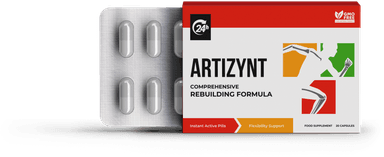

Order now and feel the difference!
Natural joint care without side effects. Thousands of satisfied customers already trust ArtiZynt.
Follow us
Order Now
Fill out the form – we'll call you back